
Peer-to-peer fundraising • Step-by-step help
Your 2027 Pledge the Pink Fundraising Guide: How to Use Zeffy
Everything you need to create or join a team, fundraise solo, activate your account, and keep track of your progress—without making duplicate pages.
- Check your teamDon't create a duplicate team.
- Choose your pathSolo pages can't create or join a team later.
- Check your emailActivate your existing Zeffy account first.
The Pledge the Pink 2027 fundraising campaign is officially open! We're using Zeffy for our peer-to-peer fundraising pages this year. That means you can raise money on your own, create a team, or join a team that's already set up.
We've put together this step-by-step guide to help you get it right the first time, personalize your page, track your progress, and share it with your friends and family.
Start here: Open the Pledge the Pink 2027 fundraising campaign.
First things first: Choose the right fundraising option
Before creating a fundraising page, decide which of these three options is right for you:
- Create a team: You're starting a brand-new fundraising team and want others to join it.
- Join a team: Someone else has already created your team, and you want your own fundraising page connected to it.
- Fundraise solo: You're fundraising independently and do not plan to create or join a team.
IMPORTANT: If you choose to fundraise solo, you cannot simply turn that same page into a team page or join a team later. Many FlockStars decide to join a team after they've started fundraising, so please think about this before selecting Solo. If there's even a chance you'll want to be on a team, sort out your team first.
Please also check whether your team already exists before creating a new one. We want to avoid duplicate teams and multiple pages for the same person.
Step 1: Open our campaign and click Fundraise
- Go to the Pledge the Pink 2027 fundraising campaign.
- Look for I want to help fundraise and select Fundraise.
- Choose the option that matches your plans: Create a team, Join a team, or Solo campaign.
Remember: clicking Donate is for giving money. To set up a page so other people can donate to you, you need to choose Fundraise.
Step 2: Set up your page
Option A: Create a brand-new team
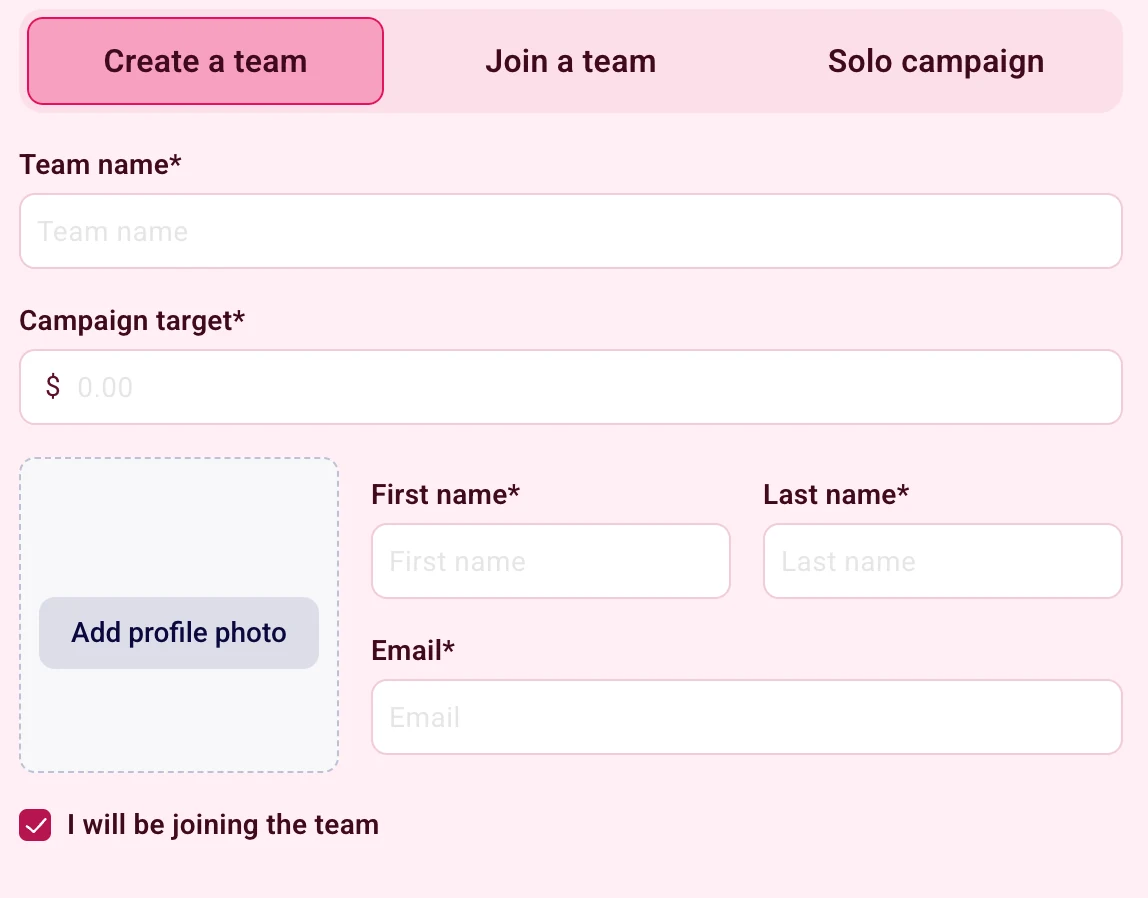
Choose Create a team if you're the person organizing a new team.
- Check first that your team hasn't already been created by another member.
- Select Create a team.
- Enter your team's name. Use the name everyone will recognize so members can find it easily.
- Add a team fundraising goal and a profile photo if you'd like.
- Enter your own first name, last name, and email address.
- If you'll personally be fundraising as part of this team, check I will be joining the team. This creates your own participant page under the team too.
- Click Create team to finish.
Once your team exists, tell your teammates to use Join a team, select your team from the list, and create their own pages.
Please don't create the same team more than once.
Option B: Join an existing team
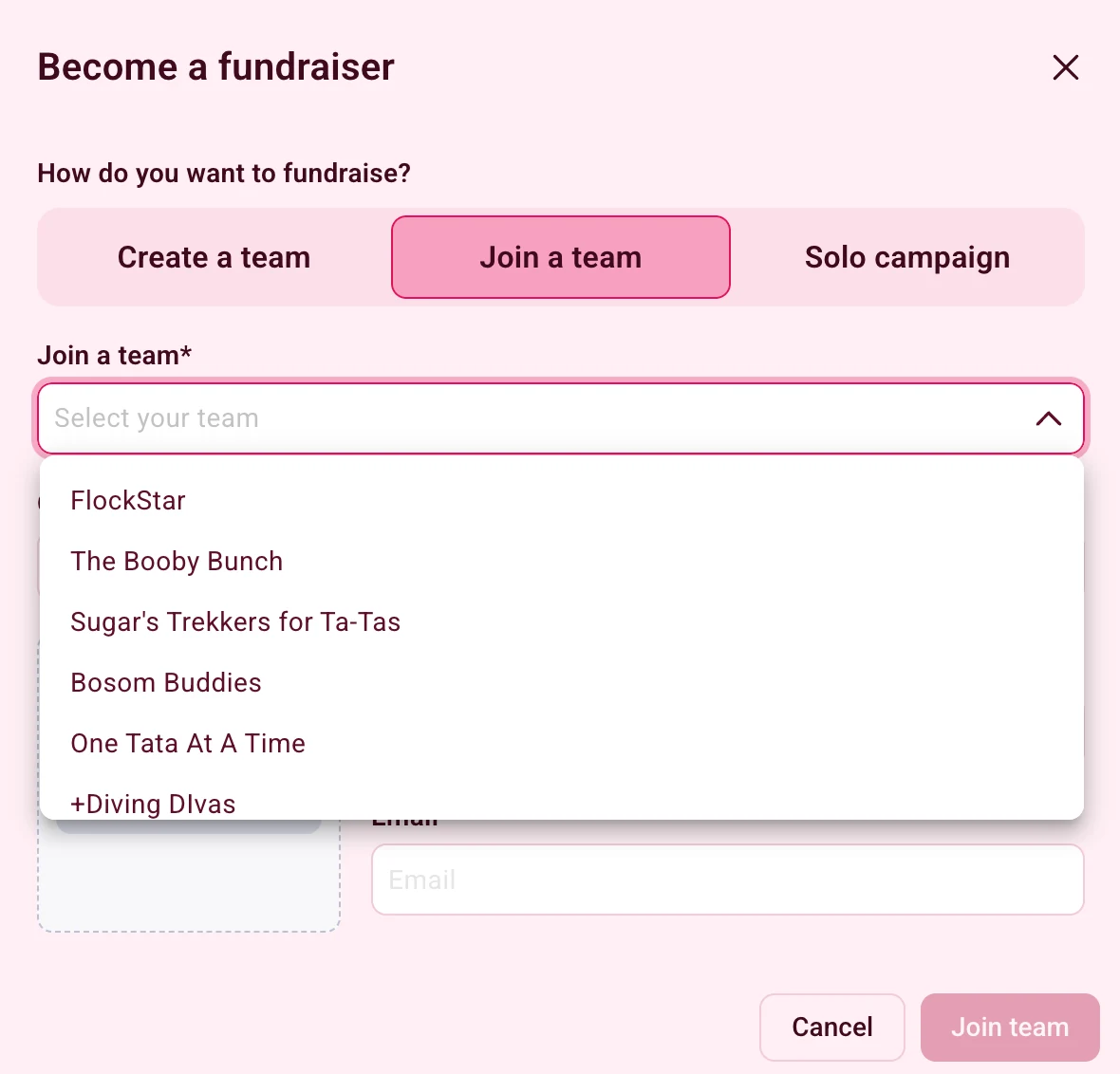
Choose Join a team if a team member or captain has already created your team.
- Select Join a team.
- Find and choose your team from the available list.
- Set your own personal fundraising goal.
- Add a photo if you wish, and enter your name and email address.
- Select Join team to create your own page under that team.
Can't find your team? Don't create a second one. Ask your team captain to check whether it has been set up, then come back and join it.
Option C: Fundraise solo
Choose Solo campaign only if you're sure you want to fundraise independently.
- Select Solo campaign.
- Enter your personal fundraising goal.
- Add a photo if you'd like.
- Enter your name and email address.
- Submit the form to create your personal fundraising page.
One last reminder: a solo page isn't something you can later change into a team page or use to join a team yourself. Please don't choose Solo just because your team hasn't been created yet. If you're unsure, confirm your team plans before signing up.
Step 3: Check your email immediately and activate your Zeffy account
This is one of the most important steps in the whole process.
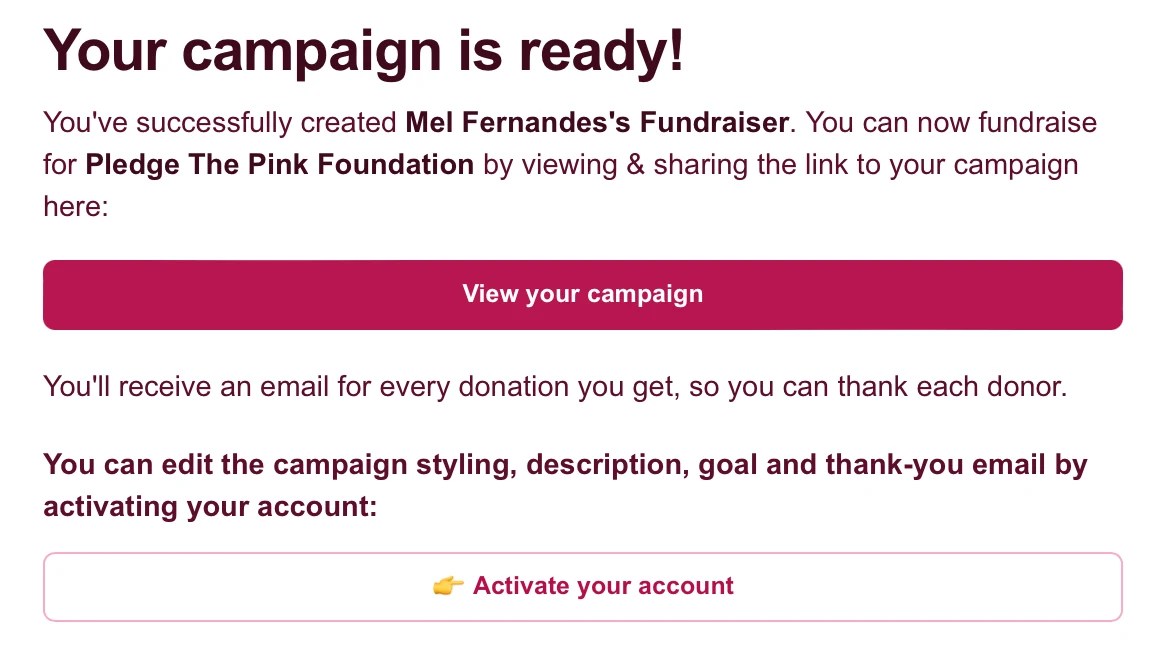
As soon as you finish setting up your page, go straight to your email inbox and look for the messages from Zeffy.
- Find the confirmation email for your new fundraising page. Check your Spam, Junk, or Promotions folder if needed.
- Click View your campaign if you want to open your page right away.
- Then click Activate your account so you can log in later and manage your page.
- If you haven't activated your Zeffy account yet, go to zeffy.com/login and enter the exact same email address you used when setting up your fundraiser.
- Open the account-access email Zeffy sends you and follow its link to finish access to your account.
- Make sure you can sign in and see your existing fundraising page before doing anything else.
PLEASE DO NOT return to the fundraising form and create a new page because you can't find your original one. That leads to duplicate profiles and can cause confusion about which page your supporters should use.
If an email hasn't arrived, use Zeffy's login page with your original email to request another account-access link. Keep using that same email each time you log in.
Step 4: Log back in and find your fundraising page
After your account is active, you can access your page anytime:
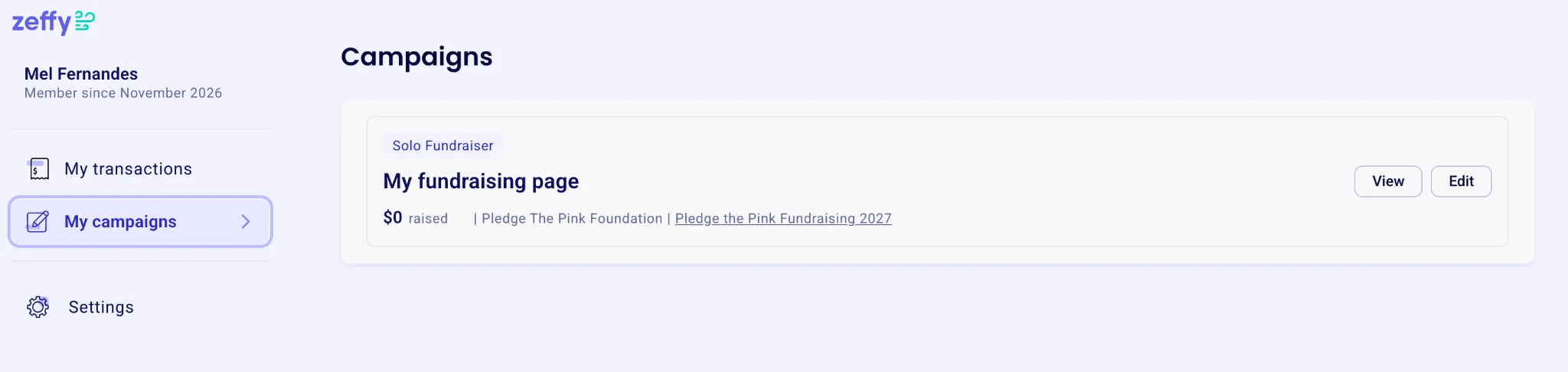
- Go to zeffy.com/login and sign in.
- Open My campaigns in your Zeffy account.
- Find your Pledge the Pink 2027 fundraising page.
- Select View to see the public page that people will donate through, or Edit to make changes.
If you have supported other campaigns, you may see more than one entry. Make sure you're working on your 2027 page rather than a previous campaign.
Step 5: Personalize your fundraising page
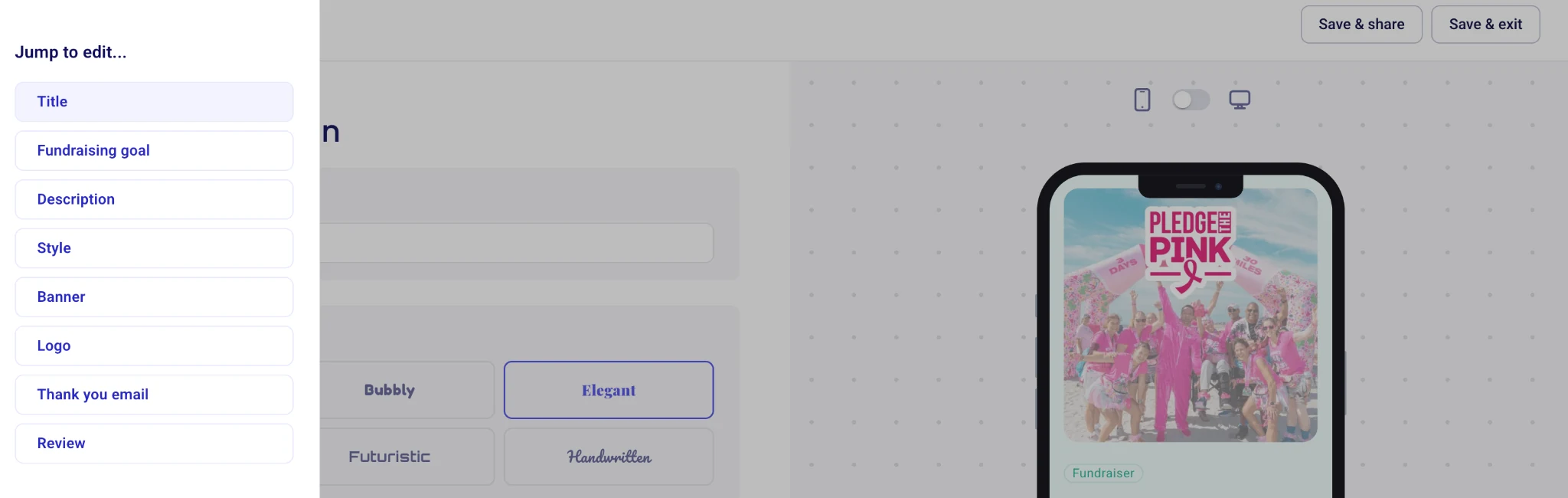
Your page will be much more meaningful to donors when it sounds like you. Once you've clicked Edit, Zeffy lets you customize things such as:
- Your fundraising goal: Choose a target you're excited to work toward; you can update it later.
- Your story: Tell people why you walk, who you're honoring, and why Pledge the Pink matters to you.
- Your photos and banner: Add an image that helps your family and friends recognize your page.
- Your page title and appearance: Make it personal and easy to identify.
- Your thank-you email: Customize what supporters receive after donating.
Save your updates, then use View to check how your page looks to visitors.
Step 6: Check your fundraising total and donations
To see how your fundraising is going:
- Log into your Zeffy account and choose View beside your fundraising page, or open your personal page link.
- Check the amount raised and progress toward your goal.
- Look for the public donor list or supporter messages, if that section is enabled for the campaign.
Some donors choose to give anonymously, so you may not see every supporter's name. My transactions in your Zeffy account shows donations and purchases you have made; it is not a full report of donations other people have made to your fundraising page. Detailed payment and donor records are managed by Pledge the Pink's campaign administrators.
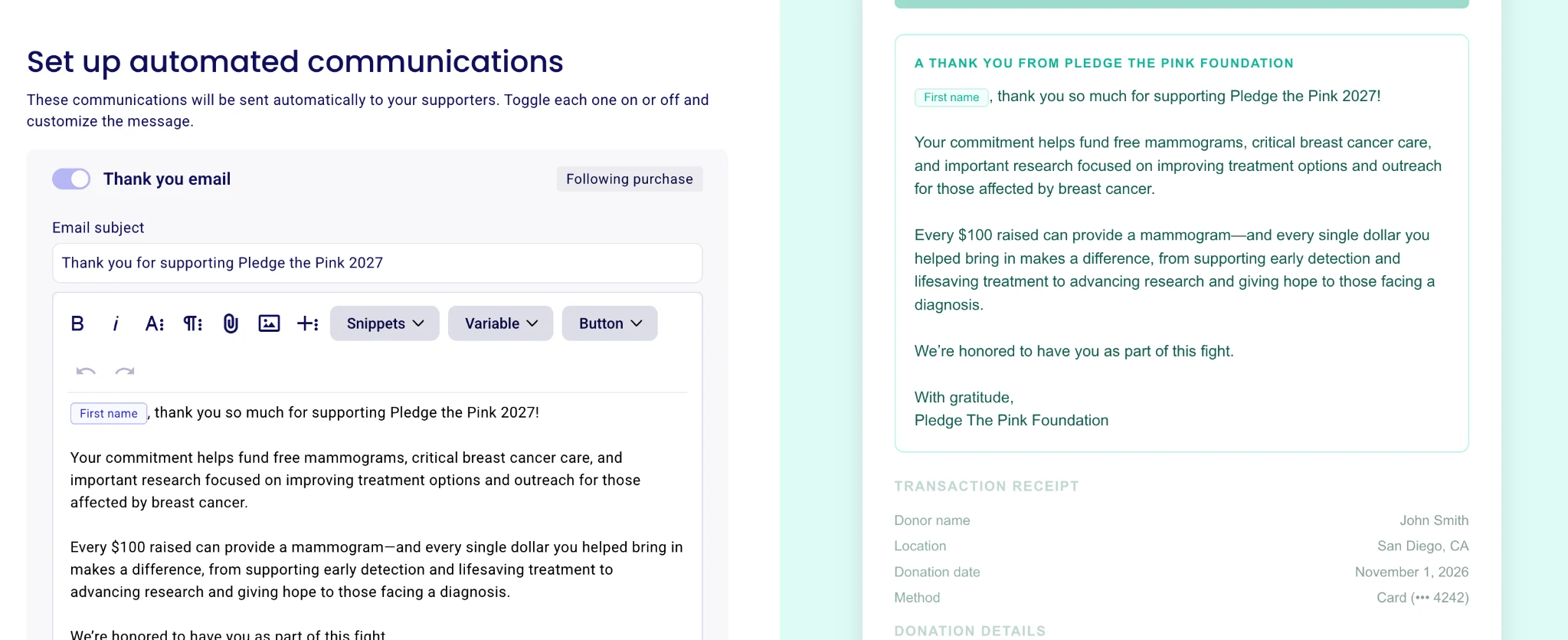
We know many of you love to thank your donors. To make sure supporters receive a warm message right away, go into Edit for your fundraising page and open Thank you email. There, you can turn the thank-you email on, update the subject line, and personalize the message your donors receive after giving.
If someone says they donated but the amount doesn't appear on your page, first check that they used your personal fundraising link, rather than the main campaign or a different team member's link. If a donation was assigned to the wrong page, contact the Pledge the Pink team so we can look into it.
Step 7: Share the correct link
Now for the fun part: getting those donations rolling in.
- Log in and click View on your personal fundraising page.
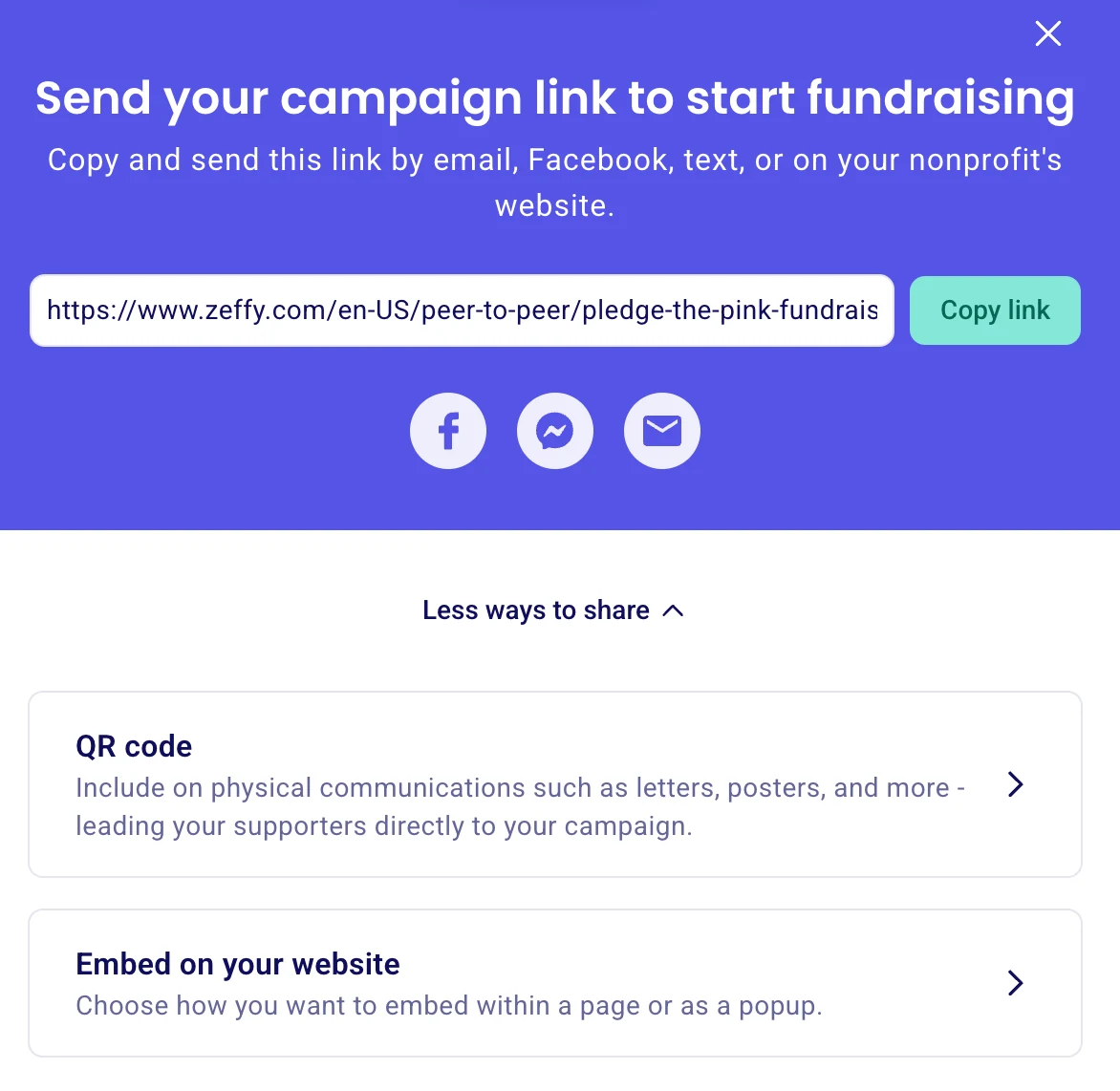
- Use Copy link if it's available, or copy the address from your browser.
- Send your own personal link in texts, emails, and social media posts.
- Ask supporters to confirm they're donating to your name before completing their donation.
If you're a team captain, share your team link when asking people to support the whole team. But if you're trying to raise money toward your personal total, share your personal participant link instead. Donations made directly to the main Pledge the Pink campaign help our overall mission, but are not automatically credited to your individual fundraising page.
Facebook Fundraising
Prefer to raise money with your Facebook friends? You can create a Facebook fundraiser benefiting Pledge the Pink Foundation and have the final amount count toward your Pledge the Pink fundraising total. Just remember: Facebook donations do not automatically appear on your Zeffy page. When your fundraiser ends, send us your final total and links so the Pledge the Pink team can add the amount to your Zeffy page.
Before starting: Make sure you've already created your personal fundraising page through our 2027 Zeffy campaign. You'll need that page to receive credit for your Facebook fundraising.
How to create a Facebook fundraiser
- Log into Facebook and visit facebook.com/fundraisers. You can also look for Fundraisers in the Facebook menu.
- Click Raise Money (or Create Fundraiser) and select Nonprofit or Charity.
- Search for Pledge the Pink Foundation and select it as the beneficiary. Double-check the charity name before continuing. Do not choose a personal fundraiser for yourself.
- Choose your fundraising goal and end date. Add a title and a little about why you're supporting Pledge the Pink.
- Choose a cover photo, click Create, and share your fundraiser with friends and family.
Tell your story! People love knowing why you're walking, who you're honoring, and what their support means to you.
How to get your Facebook fundraising credited to Zeffy
Once your Facebook fundraiser has ended and the amount raised is final, here's all you need to do:
- Take a screenshot of your Facebook fundraiser clearly showing its final amount raised and the fundraiser's name.
- Email info@pledgethepink.com with your screenshot and these details:
- Your full name
- The link to your Facebook fundraiser
- The link to your personal Zeffy fundraising page
We'll take it from there! The Pledge the Pink team will use your screenshot and links to add your final Facebook fundraising amount to your Zeffy page. You do not need to enter a donation or make any payment on Zeffy yourself. Facebook has already collected those donations, and we want to make sure they're credited to your fundraising progress without being counted twice.
Common questions (and how to avoid headaches)
I already made a page, but I can't find it. Should I start again?
No. Go to zeffy.com/login and use the same email address you originally entered. Check your inbox for Zeffy's message. Please don't create a duplicate page.
I want to join a team, but I already chose Solo. What do I do?
Don't create another profile. Contact the Pledge the Pink team. Moving or rebuilding fundraising pages may require assistance and isn't a simple switch you can make yourself.
My team isn't showing up in the list. What should I do?
Ask your team captain to create or confirm the team first. Do not create a duplicate team while you're looking for it.
Can I update my photo, fundraising goal, or story later?
Yes. Sign in to Zeffy, find your campaign, and click Edit.
Can I also raise money on Facebook?
Absolutely! Set up a Facebook fundraiser for Pledge the Pink Foundation, then follow our Facebook Fundraising instructions to have the final amount credited to your Zeffy page.
Can I see everyone who donated to me?
You can see your fundraising total and any donors displayed publicly on your page. Donors may choose anonymity, and full donation records are not the same as the personal My transactions area.
Does creating a Zeffy page register me for the Pledge the Pink walk?
No. This is our fundraising platform, separate from event registration. If you still need to register for the event, use the registration information at pledgethepink.com/register.
Ready to get started?
Whether you're starting a team, joining your flock, or flying solo, thank you for being part of Pledge the Pink. Every fundraising page and every donation helps us support breast cancer research, early detection, treatment, and care.
Create your Pledge the Pink 2027 fundraising page here
Before you go: Choose the right fundraising option, check whether your team already exists, and activate your Zeffy account using the email you signed up with before trying to make another page. Those three things will save everyone a lot of confusion.